You’ve got the gig booked, now let’s tell your fans. T
At vyb, we make it easy for you to send out an email blast to your fans. Below are the steps to make that happen.
Step 1. After Publishing Your Release, Launch a Campaign
Anytime you make changes to an event, you will get a popup that allows you to create a campaign.
Select ‘Create Campaign’
Alternatively, you can go to your dashboard and under the action menu select “+ Create Campaign”
Step 2. Edit Email Content
Now edit the campaign name, making it something you will remember. Only you will see this name
Next, edit the subject and message. Write something memorable and personal. The best announcements don’t just say I have something new, the tell the story of the music. Don’t be afraid to open up!
Now you can also change the banner image for your email.
Then you can scroll down and see a preview of the email, including the automatic call to action button we insert.
Step 3. Set Audience and Timing
The default audience is ‘All’, meaning everyone in your list. If you want to run multiple customized campaigns, just repeat this process. For example, you may want to send a special message to subscribers if they have an exclusive for this release.
Finally, set the scheduled date for your campaign email to begin and press SEND! You are done
To monitor your campaign, open “Campaigns” under the Marketing Hub.
There you can see how many emails were sent how many delivered, etc.
Tips for your Email Campaign
Your fans care about you. They want you to win. Give them a reason to root for you. Don’t just say you’re on the road and you think it’s cool. Give them some behind-the-scenes information. Tell them about the show, about the artists on tour with, tell them why they need to see this show.
The event campaigns give you a really easy way to tell all your email list about your next show. To learn more about building up your list, read these articles:
Making your merch is easy, but now let’s get the designs out there and moving!
Email is much better than social media posts, because you own your audience instead of being at the whim of the algorithm.
At vyb, we make it easy for you to send out an email blast to your fans. Below are the steps to make that happen.
Step 1. After Publishing Your Merch, Launch a Campaign
Once your merch is published and the status is changed to “Completed”, under the action menu select “+ Create Campaign”
In the same way, your can promote an entire merch collection at once by creating a campaign for that collection.
Navigate to Collections, click the action menu for that collection.
Step 2. Edit Email Content
Now edit the campaign name, making it something you will remember. Only you will see this name
Next, edit the subject and message. Write something memorable and personal. The best announcements don’t just say I have something new, the tell the story of the merch. Don’t be afraid to open up!
Now you can also change the banner image for your email.
Then you can scroll down and see preview of the email, including the automatic action button we insert.
For Collections, we will insert clickable images of the first three products in the collection and an action button that goes right to the collection on vyb.
Step 3. Set Audience and Timing
The default audience is ‘All’, meaning everyone in your list. If you want to run multiple customized campaigns, just repeat this process. For example, you may want to send a special message to subscribers if they have an exclusive for this release.
Finally, set the scheduled date for your campaign email to begin and press SEND! You are done
To monitor your campaign, open “Campaigns” under the Marketing Hub.
There you can see how many emails were sent how many delivered, etc.
Tips for your Email Campaign
Your fans care about you. They want you to win. Give them a reason to root for you. Don’t just say you’ve got new merch and you think it’s cool. Give them some behind-the-scenes information. Tell them about the artwork, tell them why this merch, give them a reason to root for you.
The merch campaigns give you a really easy way to tell all your email list about your newest merch drops. To learn more about building up your list, read these articles:
You’ve been hard at work in the studio, bringing your new masterpiece to life. The sound is tight, the lyrics fire. Time to get this music out to your fans. They’ve been waiting and they want to get it now.
At vyb, we make it easy for you to send out an email blast to your fans. Below are the steps to make that happen.
Step 1. After Publishing Your Release, Launch a Campaign
Anytime you make changes to an album, you will get a popup that allows you to create a campaign.
Select ‘Create Campaign’
Alternatively, you can go to your dashboard and under the action menu select “+ Create Campaign”
Step 2. Edit Email Content
Now edit the campaign name, making it something you will remember. Only you will see this name
Next, edit the subject and message. Write something memorable and personal. The best announcements don’t just say I have something new, the tell the story of the music. Don’t be afraid to open up!
Now you can also change the banner image for your email.
Then you can scroll down and see preview of the email, including the automatic action button we insert.
Step 3. Set Audience and Timing
The default audience is ‘All’, meaning everyone in your list. If you want to run multiple customized campaigns, just repeat this process. For example, you may want to send a special message to subscribers if they have an exclusive for this release.
Finally, set the scheduled date for your campaign email to begin and press SEND! You are done
To monitor your campaign, open “Campaigns” under the Marketing Hub.
There you can see how many emails were sent how many delivered, etc.
Tips for your Email Campaign
Your fans care about you. They want you to win. Give them a reason to root for you. Don’t just say you’ve got new music and you think it’s cool. Give them some behind-the-scenes information. Tell them about the recording, about the artists you’ve worked with on this release, tell them about the lyrics.
The music campaigns give you a really easy way to tell all your email list about your newest release. To learn more about building up your list, read these articles:
As we’ve been working with different artists, we keep running into the headaches of keeping all their bio links updated. Since at vyb we have your email signup, music, merch, and everything else, we decided to make a free Link-in-Bio Tool that you can easily use. Like our free email list sign-up landing pages, we are making life easier to stay connected with yoru fans and give them an easy way to access everything you have.
Our tool will automatically populate based on your content on vyb. For example, as soon as you make your first merch item, the merch store button will automatically populate. Have any upcoming events? The event link button will auto-populate. No more having old, stale links.
The service is 100% free. Because we win when you win.
Here are the steps to configure and use this yourself.
Step 1. Navigate to Link-in-Bio on your Dashboard.
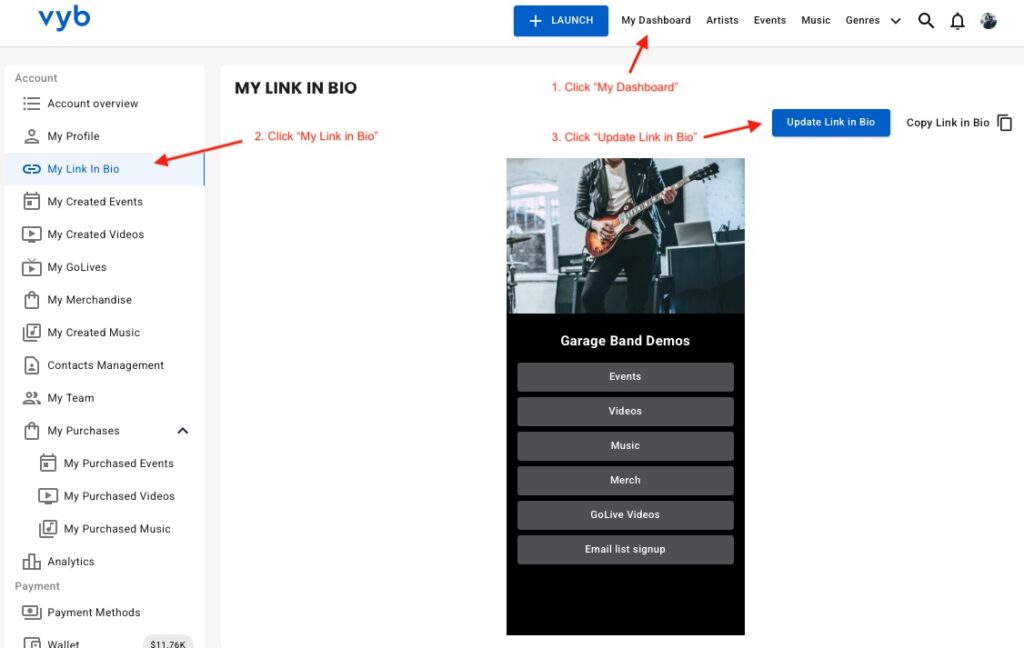
First click on “My Dashboard” and then click on “My Link in Bio”
You will see your current Link In Bio.
From here, you can copy the link to it or update it.
Next click “Update Link in Bio” button to start configuring it
Step 2. Select Social and Music Platforms
Now simply select all the social and other content sites that you want. These will show up as icons underneath your name in your bio for easy access
Note that you can also add a generic button to your Link in Bio if you want something to be more prominent.
Step 3. Edit URLs for the selected links and Your Image
Next enter in the URLs for each of your social and music platforms.
Now re-order these links by selecting their icon and dragging it.
On the right hand side you can replace the picture that shows up on the top of your Link in Bio
Step 4. Edit Buttons
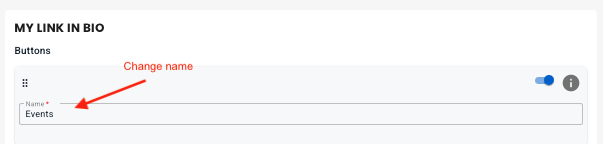
We have pre-populated your Link In Bio with links to everything in your vyb account. You don’t need to manually add those at all. You can change the name, but realize that each of these is preset to always go to that service. For example Merch button will always go to your vyb merch store.
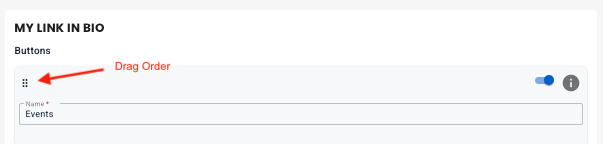
Now you can drag the buttons to re-order them.
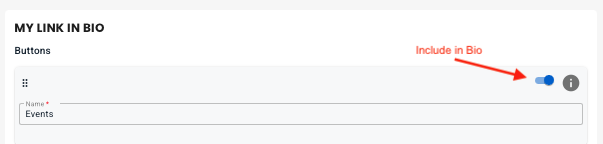
Next, you can also include or exclude any default button, but know that if you don’t have any content in that area we will auto-hide it anyway. For example, until you post some GoLives your GoLive button will be hidden.
Step 5. Add Custom Buttons
Next, if you want to add your own custom buttons, click “+ Add Button” to add your own button. Give it a name and a URL
Step 6. Style Your Link-in-Bio
Now choose one of the preset themes at the top for an initial starting point.
Next you can change the overall change background color, your name text color and font
Edit the button styles, picking color, font and transparent or solid.
Finally, when you are done, click “Save” and you are done editing.
Step 7. Add your Link-in-Bio to your Instagram and other Platforms
Finally, it’s time to go live and use your new Linke-in-Bio! Back on the main Link-In-Bio dashboard page, copy the link.
Paste this into your Instagram and all other services to give a one stop place for your fans to get to you.
On vyb, you can build and nurture your fan base by directly connecting with you Fans and Super Fans through exclusive content and unique experiences.
Understanding your Audience
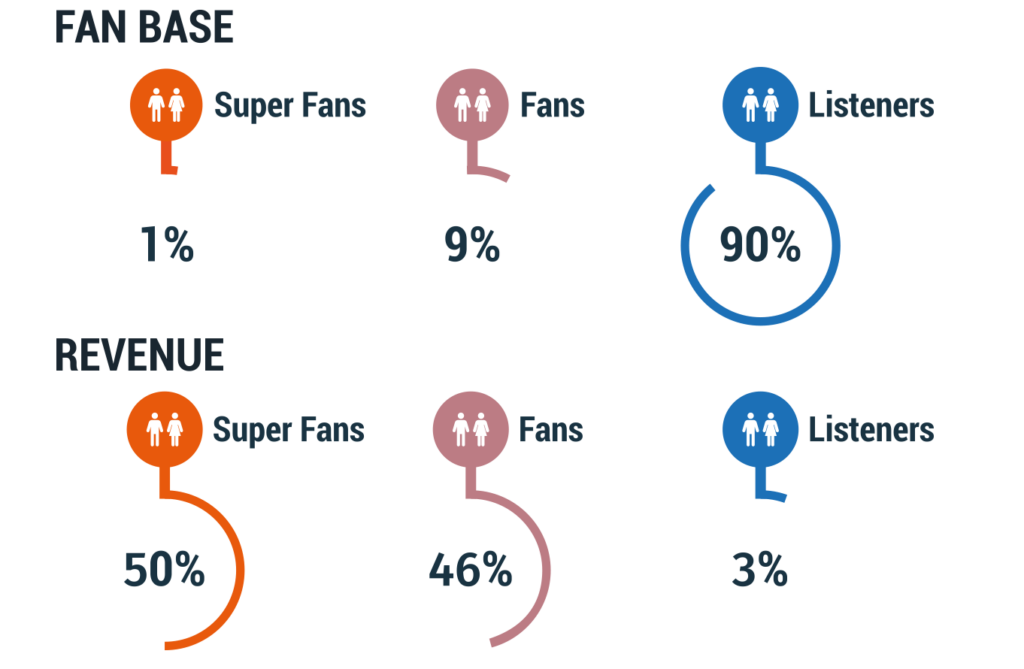
Your Audience is made up of three main categories: Listeners, Fans and Super Fans. It seems crazy, but there is a stark difference between these three and the smallest number of Super Fans really drive your income.
Super Fans – always buys a concert ticket, always buys the merch.
Less than 1% of your Audience
Over 50% of your income
Fans – buys music, a concert ticket or merch once in awhile
Approximately 9% of your Audience
A little over 46% of your income
Listeners – casual fans that might hear you on streaming services or see you on social media
Over 90% of your Audience
Around 3% of your income
1% of your fan base provides HALF your income
Very importantly, because those Super Fans are your main drivers, you want to really nurture them. Think of how you give them special content and exclusives. They want the behind the scenes stuff, the raw unfinished song, the setup for the big show.
Audience Types in vyb
In vyb we have three types in your audience
Subscribers: these pay a monthly fee to get exclusives and discounts. For you, they provide regular income and a very targeted list to market everything new you do. You want to get your Super Fans signed up as Subscribers.
Followers: These fans have indicated they want to be kept up to date with what you are doing. When you add people to your email list on vyb they are automatically signed up as Followers.
Fans: people who don’t follow or subscribe, but just are on the platform. These people can still buy merch, they can still buy tickets. We want to convert these fans to Followers and Subscribers
Subscriber Exclusives
Here is a list of some of the things you can do for your Subscribers:
Events
Discounted Event Tickets – automatically we’ll apply the Subscriber discount that’s in your profile, but you can also manually set that to an even higher level.
Subscriber-only events – here are some example ideas
Set up a virtual event that is only available for Subscribers
Set up a meet and greet event only available for Subscribers
Subscriber-only event tiers
For example, make the VIP seating event tier only available to subscribers.
To learn how to do these features for your subscribers, see Setting up Events
Video purchases
In vyb you can upload and sell videos. When you do, you can make the purchase exclusive to subscribers.
Discounts on Merch. Subscribers automatically get the discount in your profile
Subscriber exclusive merch. You can set up a group of merch, called a Collection, to be exclusive to subscribers. To learn how to do this, see Merch Collections
GoLive
GoLives are quick videos that you can take, think behind the scenes content.
Nurture your Followers and Subscribers, increase your success
By using these tools and putting some things for all your audience, some for Followers, and some only for Subscribers, you will excite your Fans and Super Fans. True Fans love exclusives. They want to be in the in-club. make sure you are nurturing them and you will increase your success.